 Restore Old Photos
How to colorize black and white photos
To colorize a black and white photo, scan it at good resolution, repair cracks and scratches first, then run an AI colorizer such as the Colorize tool in Restore Old Photos, Photoshop's Colorize filter or MyHeritage In Color. AI gives natural skin, sky and foliage, but it guesses the colors of clothes, cars and walls, so keep the black and white original.
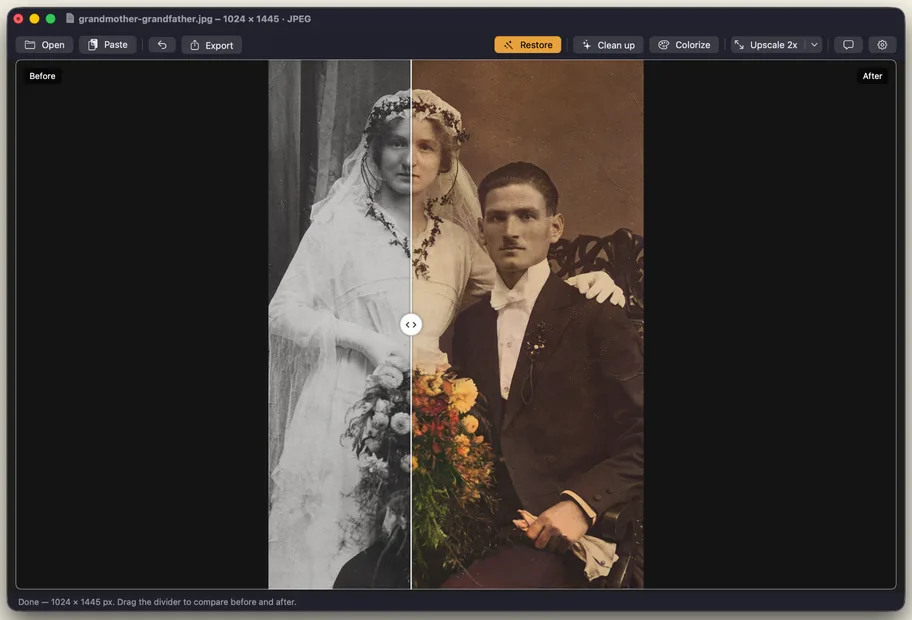
How AI colorization works
A black and white photo records only brightness. The color information is gone, so no software can read it back. A colorization model learns from millions of color photos which colors usually go with which shapes and textures: skin, sky, grass, wood, fabric. When it sees a gray face, it predicts a skin tone; when it sees a gray sky, it predicts blue.
Restore Old Photos uses DDColor, a colorization model published at ICCV 2023. It runs on your own Mac or PC, so the photo is never uploaded.
What AI gets right, and what it guesses
| Usually convincing | A guess, check it |
|---|---|
| Skin tones, hair | Clothing, ties, dresses and hats |
| Sky, grass, trees, water | Cars, painted walls, doors and signs |
| Wood, brick, sand, stone | Flowers, flags, uniforms and badges |
| General warmth of indoor light | Eye color |
If you know a real color, for example a uniform, a family car or a wedding dress, write it in the caption. Do not trust the AI for historical record. Plain, empty backgrounds can also pick up uneven tints, so look at the whole frame, not just the faces.
Step by step in Restore Old Photos
- Open the scan on your Mac or Windows PC: Open, paste or drag it in.
- Fix the damage first. Press Restore if the photo has cracks, spots or scratches, or Clean up if it is only grainy. Colorizing over damage colors the damage too.
- Press Colorize (⌘2 on Mac). The first run downloads the colorization model, about 420 MB, and it works offline after that.
- Compare. Drag the divider across faces, clothes and background. If you do not like the result, Undo returns the black and white version.
- Upscale last if you want to print it larger, then export as PNG or JPG.
Your first Colorize is free. After that, Pro costs $19.99 once, or a yearly or monthly subscription.
Other ways to colorize
- Photoshop Colorize Neural Filter: adds color to black and white photos, and you can then adjust colors by hand. Requires a Photoshop plan, from $22.99 a month on an annual plan.
- MyHeritage In Color: colorizes uploaded photos in your MyHeritage account. A few photos are free with a watermark, then a subscription.
- Palette.fm: an online colorizer. The free tier limits images to 500 by 500 pixels with a watermark, and paid plans start at $6 a month. Photos are uploaded.
- By hand: paint color on separate layers in Photoshop or GIMP. It takes hours, but you choose every color.
For a fuller comparison, including where each tool sends your photo, see every method compared.
Tips for natural results
- Start from a good scan. Grain and dust confuse a colorizer. See how to scan old photos.
- Sepia and faded prints work too. The model reads brightness, so a brown-toned print is treated like black and white.
- Do not over-saturate afterwards. Muted colors look more like real film from the period than bright ones.
- Label it. When you share a colorized photo, say it is colorized, so later generations do not mistake it for an original color print.
- Keep both versions. The black and white original is the historical record; the color version is an interpretation.
Colorize your first photo free
Restore Old Photos for Mac and Windows colorizes on your own computer, with no upload and no account.
Sources
- Kang et al., DDColor: Towards Photo-Realistic Image Colorization via Dual Decoders, ICCV 2023
- Adobe, Neural Filters list and FAQ and Photoshop plans
- MyHeritage, In Color; Palette.fm